

The operating system for Montessori schools.
A digital prepared environment for Montessori schools. No patchwork. No competing tools. Just systems that finally reflect what you believe.
What makes MMAP different
Every other platform in this space was built to make school administration easier. MMAP was built to make Montessori schools better.
The difference is not a feature set. It is a philosophy.
When a school leader says “we use MMAP,” it signals something about their school, not just about their software. Read the long version →
The questions
Five questions software for Montessori schools usually can’t answer.
Lesson tracking, billing, and parent communication are table stakes. Every platform does those things. These five are the questions that keep heads of school up at night, and the questions no other software in this space has tried to answer.
01
Is your staff growing?
Coaching cycles, appraisals, role clarity, and an upward-feedback loop that helps your team actually develop.
02
Are your outcomes equitable?
Demographic dashboards, ABAR pathways, pulse surveys, and financial equity analysis built into the operating layer.
03
Is your board making decisions from real data?
Board snapshots, governance reports, strategic planning, and Leadership Meridian — a command center that surfaces open decisions before the meeting starts.
04
Are you retaining your guides?
A staff culture and retention hub that names what is keeping people up at night, before the resignation letter lands in March.
05
Is your adolescent program actually Montessori?
Council, seminars, occupations, and trips, run with the structure adolescents need and the philosophy your school says it teaches.
What schools usually settle for
Three kinds of software Montessori schools usually settle for.
The market is fragmented into three camps. None of them was built to be the operating system of a Montessori school.
Classroom record-keeping tools
Strength
Strong at lesson tracking and observations. Built for the guide.
Limit
Require two to four other products bolted on to run a whole school.
Childcare operations platforms
Strength
Strong at billing, attendance, and parent messaging. Built for daycare scale.
Limit
Montessori is a feature, not a foundation. The philosophy was added on top.
Admin and admissions tools
Strength
Strong at enrollment pipelines and tuition. Built for the front office.
Limit
Stop at the office door. No classroom layer, no staff layer, no equity layer.
The fourth option
MMAP is the only platform built to be the operating system of a Montessori school, from classroom to boardroom.
Built by someone who has run one. Configured for your school, by Hannah, in person at onboarding.
What’s included that nothing else is
Eight categories no other platform in this space is building.
We checked every major platform a Montessori school is currently buying. These eight categories appear on none of them, at any tier, at any price.
Equity & belonging infrastructure (ABAR)
Board governance & reports
Strategic planning hub
Leadership Meridian
Coaching cycles & appraisals
Staff culture & retention hub
Adolescent program suite
MatchHub job posting integration
A note on what stays human
Observation is not a feature.
Some software in this space writes a child’s progress report for their family, composes a parent message on a guide’s behalf, and turns a photo of a work cycle into a paragraph nobody at your school wrote.
MMAP does not.
The observation cycle, the conversation with a family, and the work of seeing a child are the prepared adult’s job. We built the platform to lift the friction off that work, not to do it for them.
What the platform handles
- Translating a family message across 17 languages, so multilingual families read the guide’s words, not a stripped-down summary.
- Compiling a quarter of observations into a printable progress report, in the format your school already uses.
- Flagging when a child’s work pattern shifts, so the guide can take a closer look.
What stays with the adult
The seeing, the writing, and the conversation.
A photo, a lesson note, and a parent conversation are still human work. We will not put the platform between a guide and a child.
Why the Alignment Platform Exists
Montessori schools don't need more tools. They need their systems to work together.
Montessori schools are rich in mission. But their systems often lag behind their values. Generic school software wasn't built for Montessori—it forces you to translate everything, and something always gets lost.
The Alignment Platform brings mission and infrastructure into alignment. Built from the ground up for the way Montessori schools actually operate—without corporatizing what makes them unique.
Alignment is not an aspiration. It is infrastructure.
Guides tracking lessons in one app, attendance in another, observations in a notebook
Family communication that bypasses leadership because there’s no unified system
Directors holding institutional memory in their heads because there’s no place to put it
Leadership making decisions without data that reflects Montessori values
What the Alignment Platform Is
Not a bundle of tools. One coherent operational environment.
The Alignment Platform is a digital prepared environment for Montessori schools. The same philosophical commitment that shapes the prepared physical environment — intentionality, coherence, respect for the person — shapes how the Alignment Platform is built. Every feature, every workflow, every data point is designed to reflect what Montessori schools actually believe. Not translated from generic school software. Built from the ground up.
The Four Tiers
Every Montessori leader does four kinds of work.
MMAP is built around them. The tiers are not pricing buckets — they are practitioner identities. Most leaders move through all four over the course of a tenure.
Tier 01
Surveyor
The work of looking
The Surveyor stands on the territory and looks at it. She is not yet committed to a destination. She is gathering information. What is here. What is the shape of this land. What has already been built. What is broken. What is hidden.
Surveyor work is the diagnostic phase. Observation before intervention. The practice of seeing what is, before deciding what to do.
Most leaders skip this phase, because the urgency to act is constant and the cost of seeing is real.
Tier 02
North Star
The work of clarity
The North Star practitioner has named a destination. She has done the Surveyor work, and now she knows where she is going. She has an Aim. She holds it under pressure. She returns the team to it. She refuses the distractions that would take the school somewhere else.
Most schools that have a North Star do not know they have one. The work of this tier is to make it visible, name it, and commit to it.
Tier 03
MapMaker
The work of building
The MapMaker takes the destination and builds the path. She draws the Scheme. She implements. She holds alignment and accountability. She sustains the institution. She prepares the adult culture. She keeps equity at the center. She leads in a way that the school can survive.
The longest tier and the most demanding. Most school leaders spend most of their tenure here.
Tier 04
Atlas
The work of holding many maps
The Atlas holds many maps at once. The school is one map. The home is another. The community is another. The policy world is another. The global field is another. The future is another. She does not specialize. She holds them in their relationships to each other, and acts at the level of the system rather than the level of any single map.
The work of the most experienced Montessori practitioners. The work the field most needs at this moment.
The Alignment Platform Pathway
Four tiers. One coherent system.
From the classroom to the boardroom—The Alignment Platform covers every level of the organization with tools that are built to work together.
Surveyor
Classroom visibility and guide workflow. Track lessons, observations, and each child's progress without retrofitting generic tools.
Atlas
NewLeadership Meridian.
The command center heads of school actually need — built around the hardest, most recurring work of the role, from drafting difficult messages to tracking what needs legal attention. The commitments and reflections you capture in the Leadership Meridian companion app flow straight into this cockpit, so what you resolve on a drive home doesn’t get lost.
Leader's Desk Dashboard
Umbrella landing page: top open decisions, critical risk flags, this month's rhythm, next meeting, and recent drafts — all in one glance.
Embedded email drafting
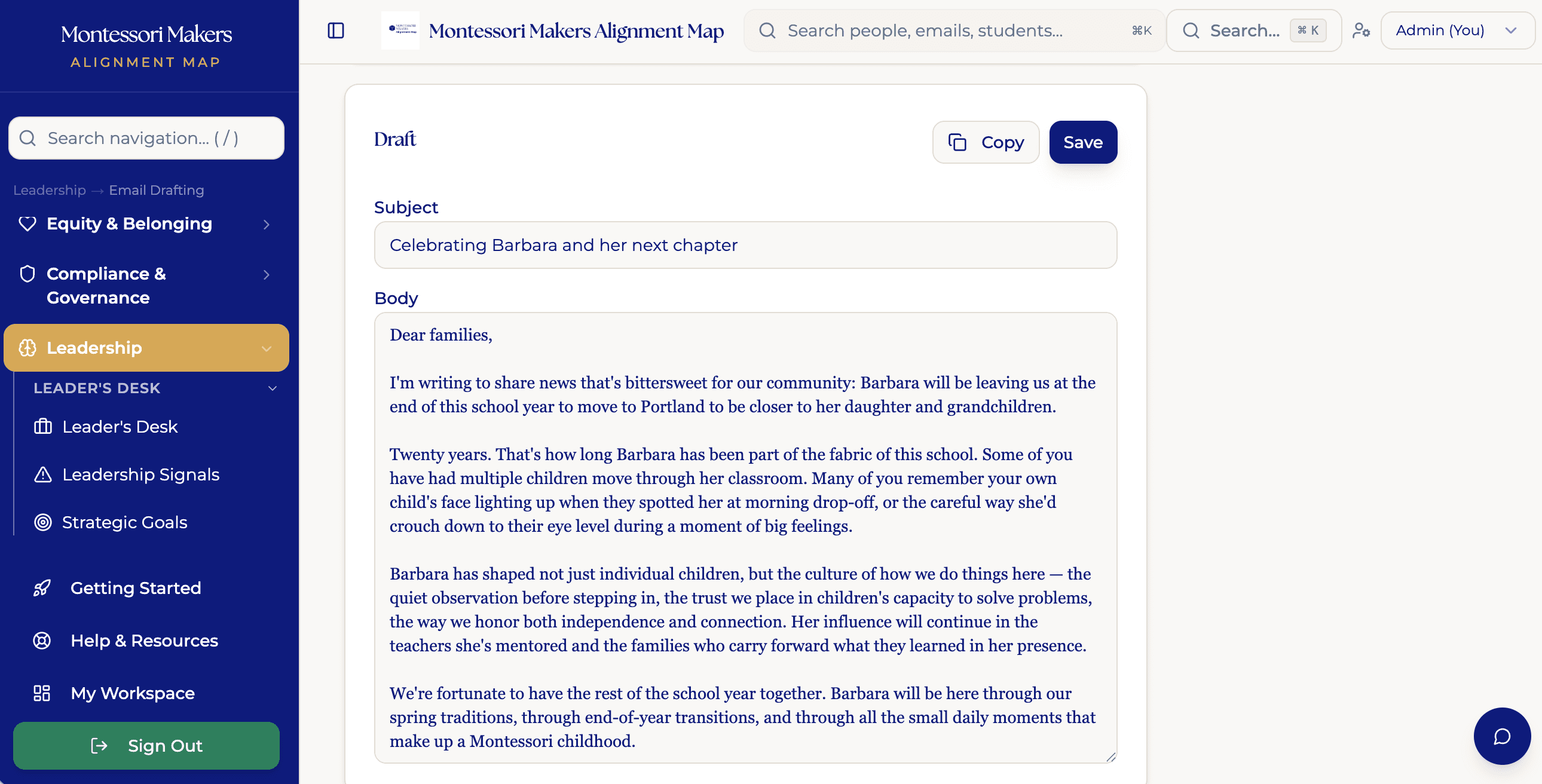
Drafts for the hard messages: parent escalation, termination letters, board updates, staff departure, reference requests. Four tones — warm, firm, formal-legal, empathetic.
Decision Triage Log
Record what's on your plate with urgency × importance × owner. Automatic legal flag detection for termination, discrimination, custody, injury, and litigation keywords.
Annual Rhythm Calendar
28 seeded Montessori admin tasks mapped to the right month — re-enrollment, hiring, evaluations, budget — with per-school progress tracking.
Risk & Legal Flags
Central registry of situations that need counsel: severity level, legal contact, and consultation tracking so nothing slips.
Document Generator
Seven template-driven documents: PIP, termination letter, reference letter, board resolution, policy update, parent welcome, staff departure announcement.
Meeting Prep Workspace
Agendas, talking points, anticipated objections with your responses, and post-meeting outcomes — for board, leadership, staff, 1-on-1, and parent meetings.
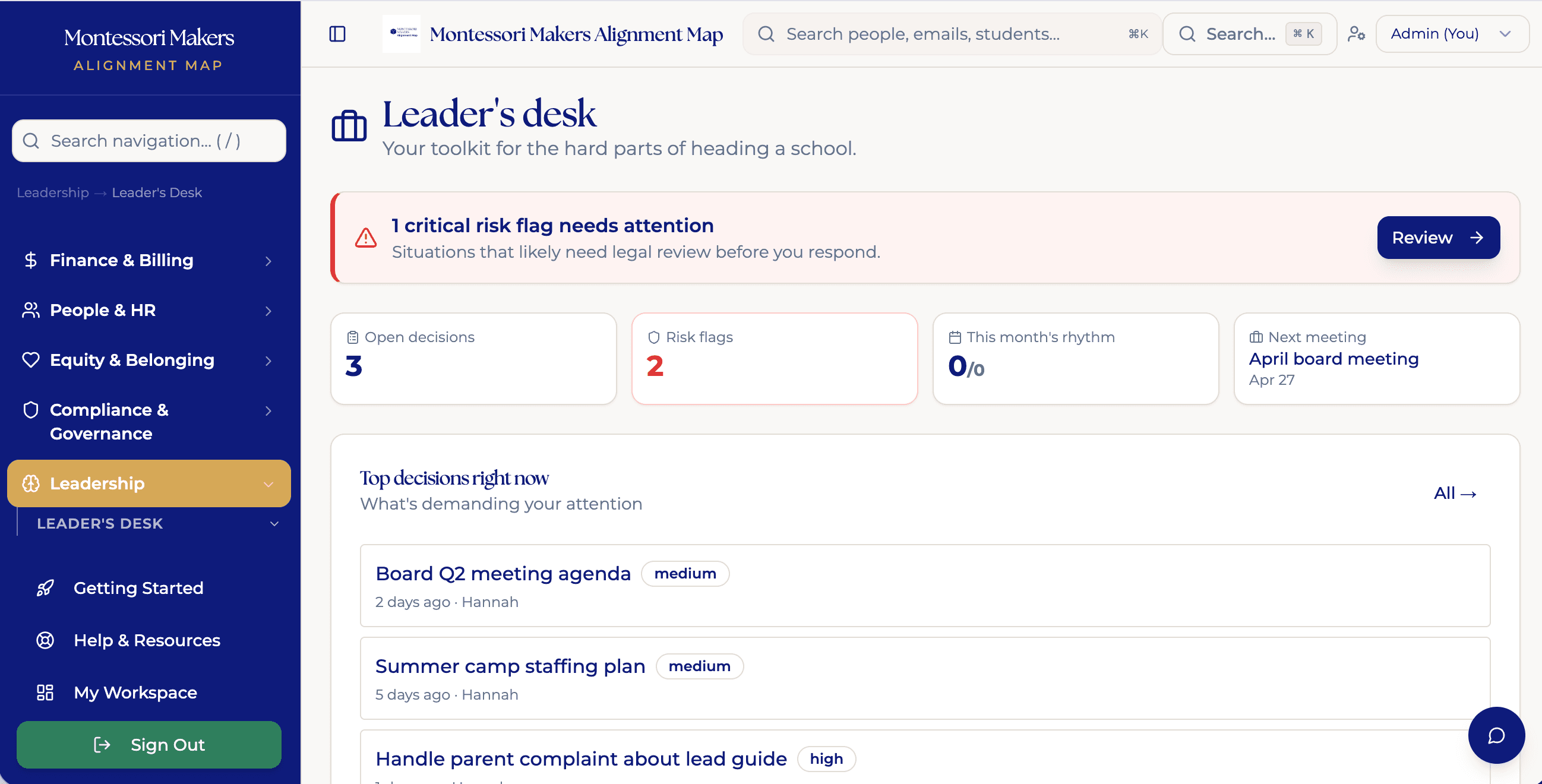
Leader’s Desk is included with all Atlas subscriptions. See Atlas pricing →
The Platform
What it actually looks like.
Every screen below is the live platform — not a mockup. This is what pilot schools are using today.
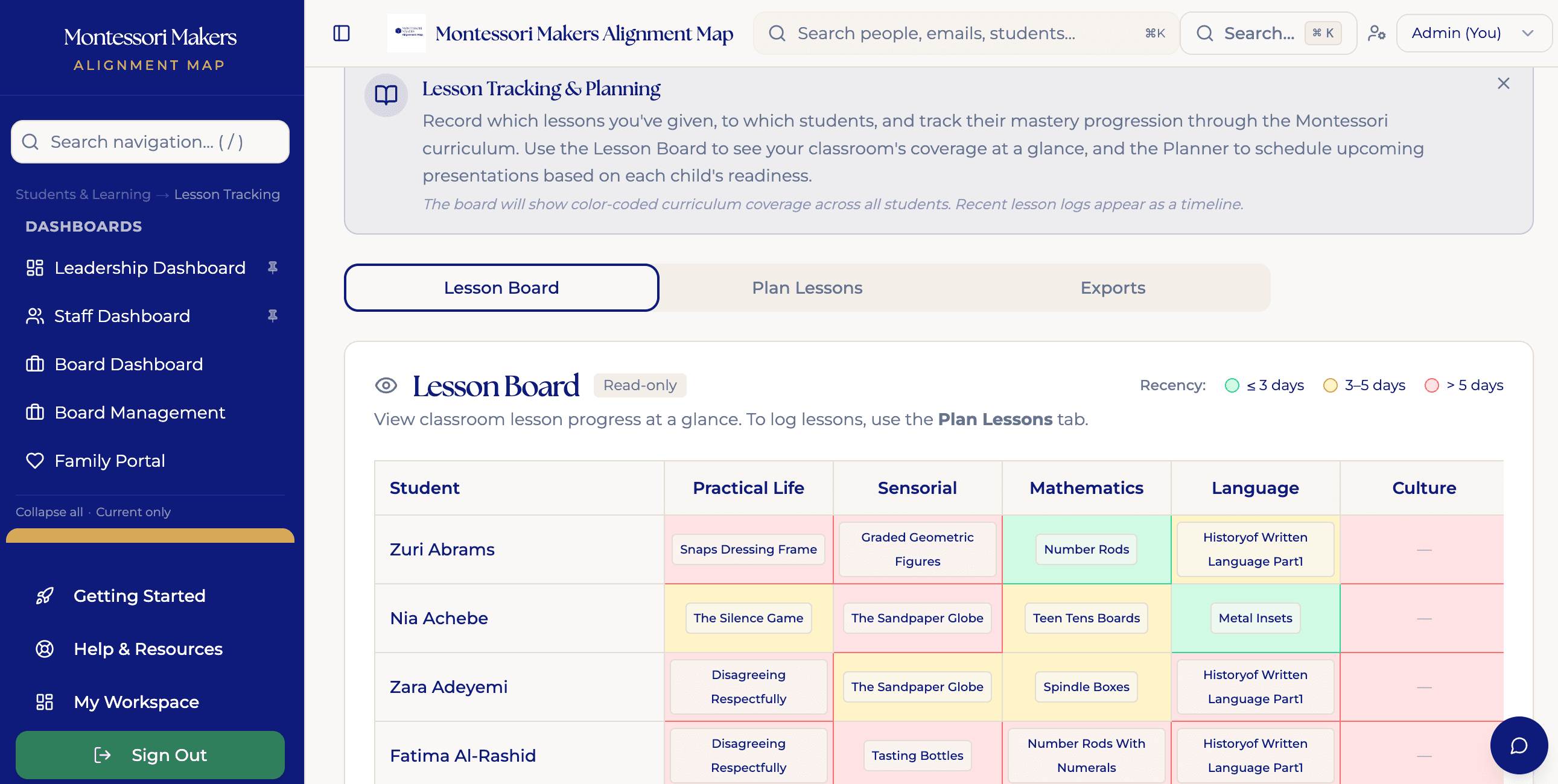
Classroom Lesson Board
Color-coded roster shows every guide exactly where each child is — presentations given, curriculum areas covered, and which children are overdue for a lesson.
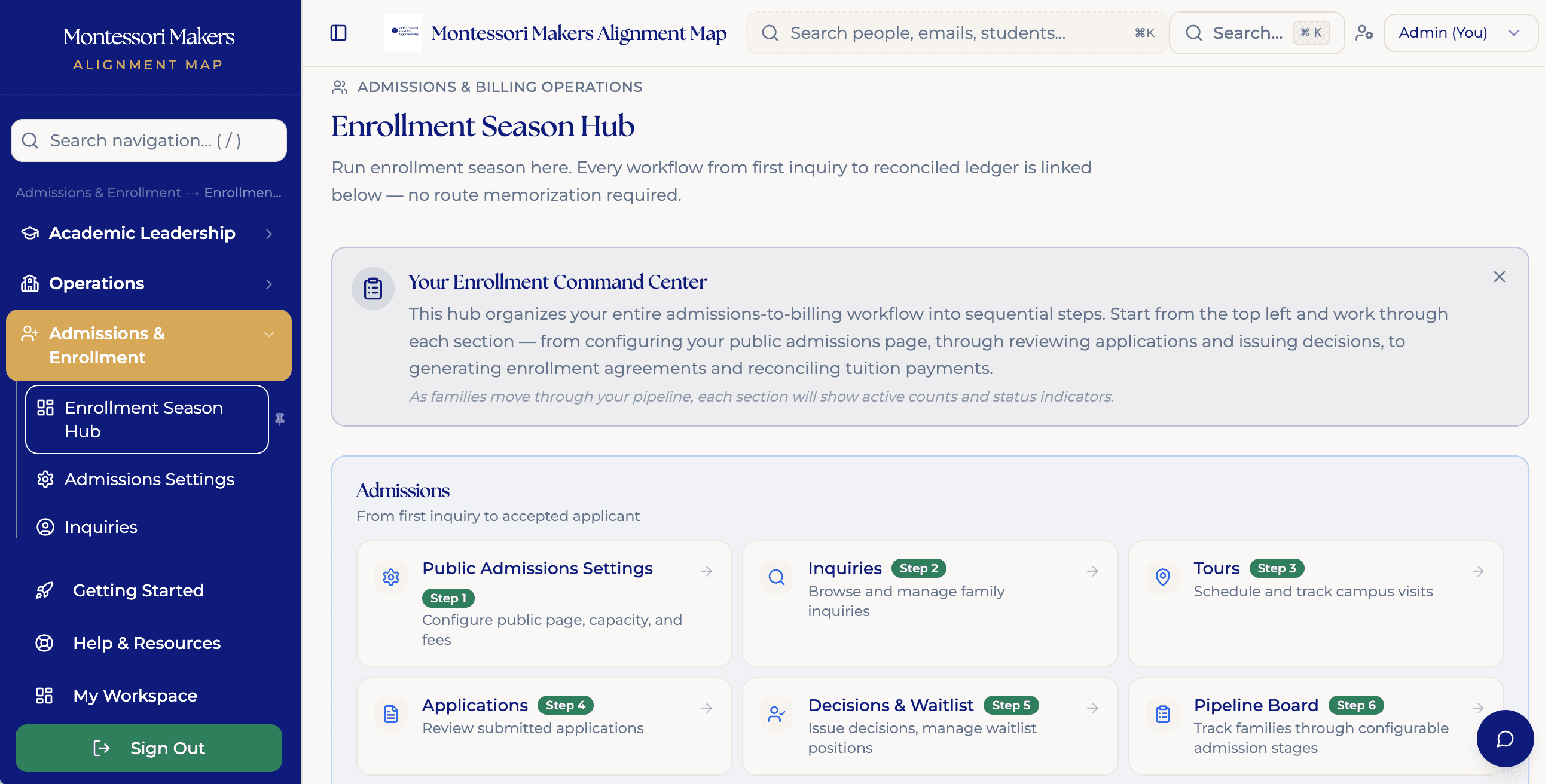
Enrollment Season Hub
The entire admissions-to-billing workflow as a sequential command center — from first inquiry and tours through signed agreements and reconciled tuition.
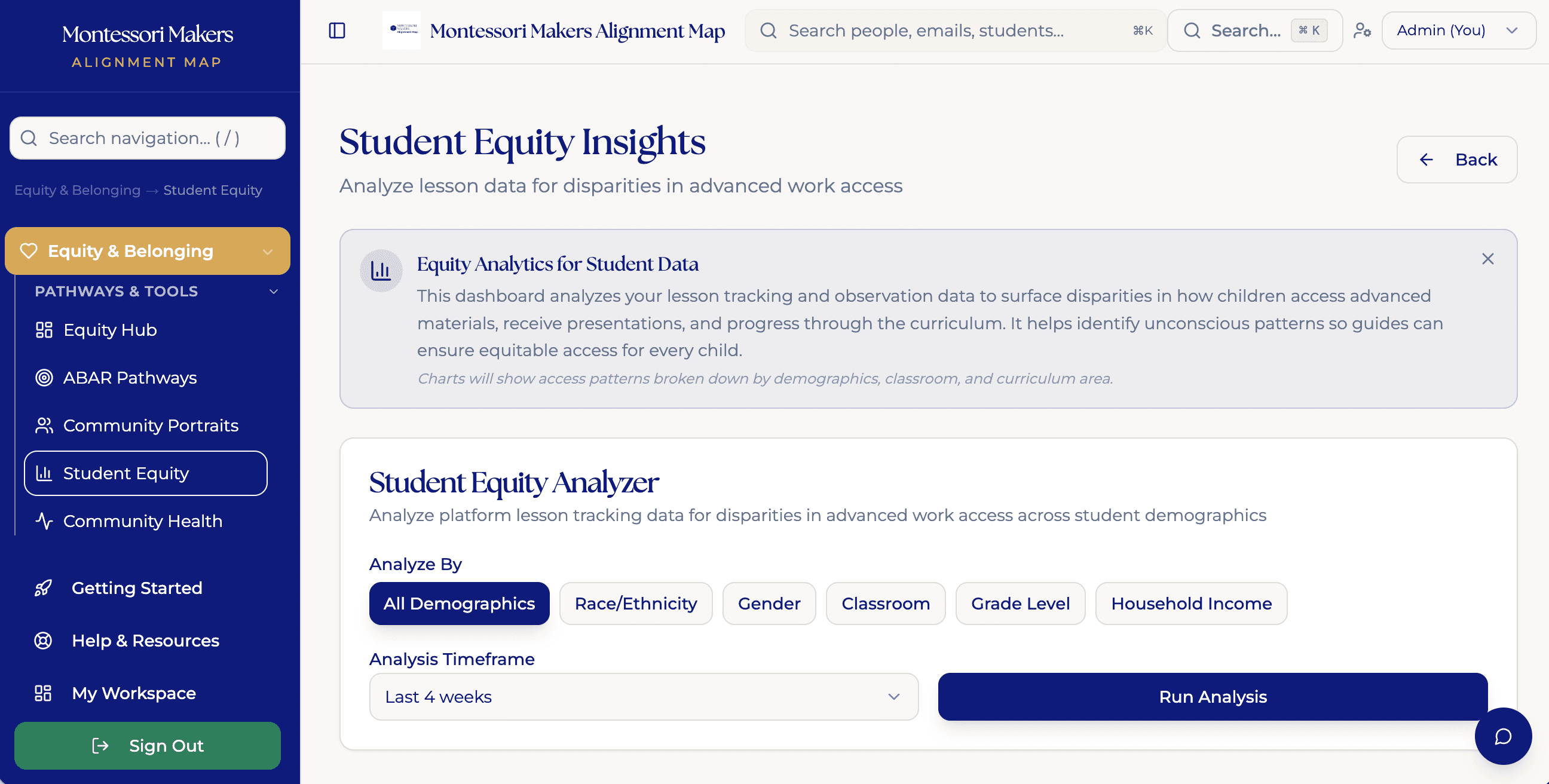
Student Equity Analytics
Surface lesson-access disparities by race, gender, classroom, or household income — so equity work is grounded in data, not instinct.
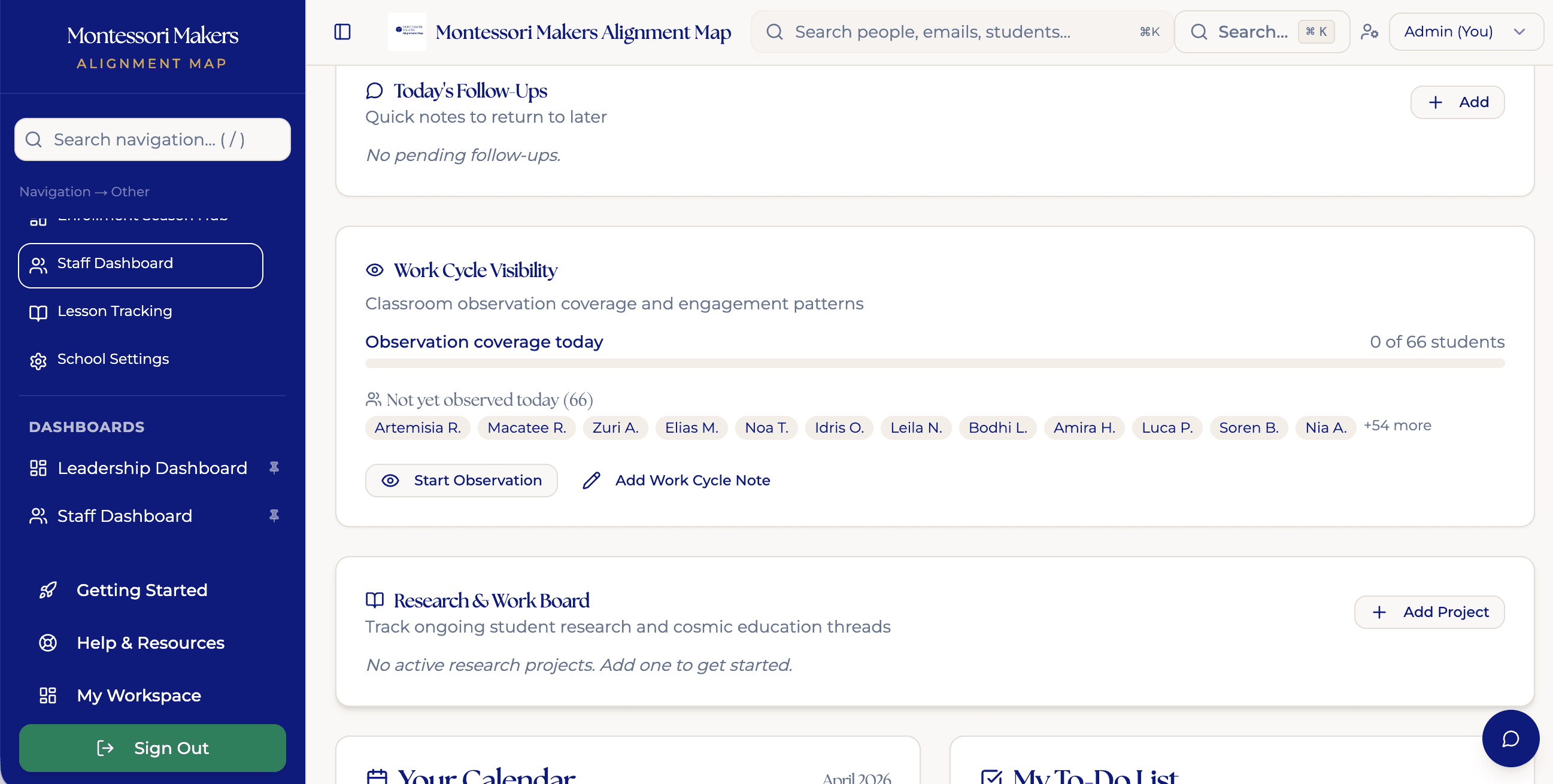
Work Cycle Visibility
Observation coverage at a glance — who has been seen today and who hasn't. Built for the three-hour work cycle, not a generic task manager.
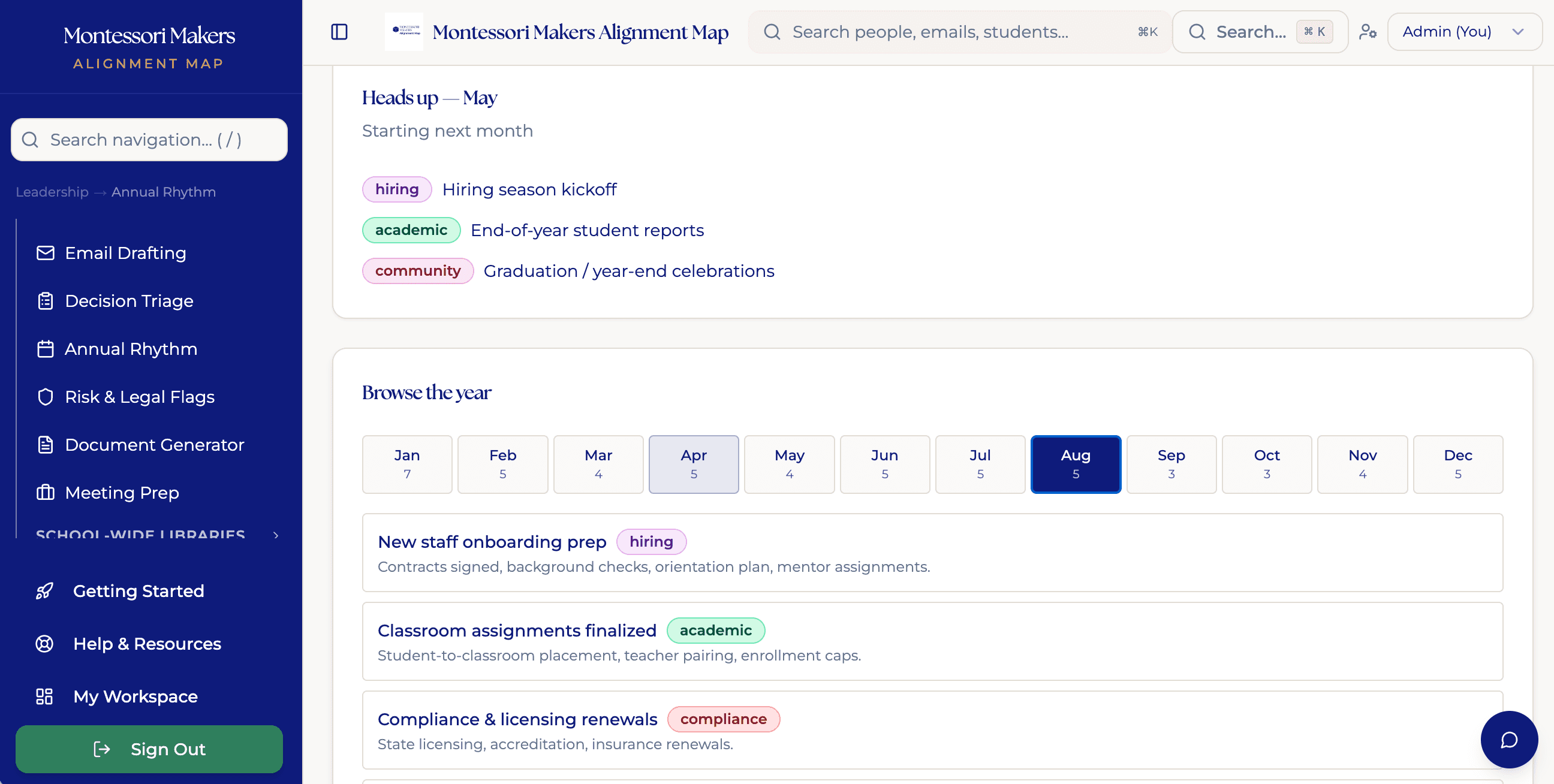
Annual Rhythm Calendar
Twenty-eight seeded Montessori admin tasks mapped to the right month — re-enrollment in spring, hiring in summer, evaluations in fall, budget in winter.
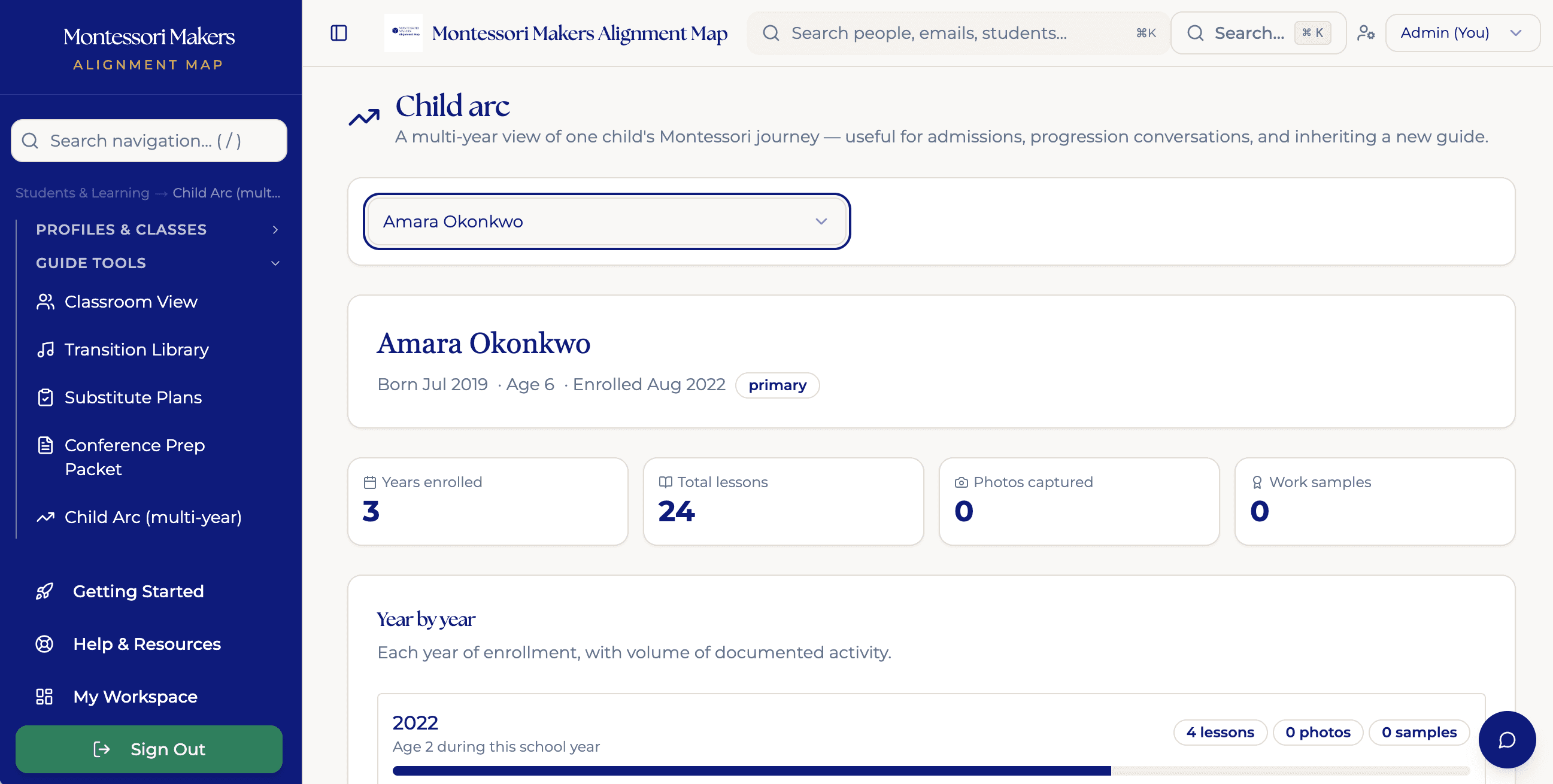
Child Arc
Multi-year longitudinal view of a child's Montessori journey — lessons, photos, and work samples across every classroom from enrollment to graduation.
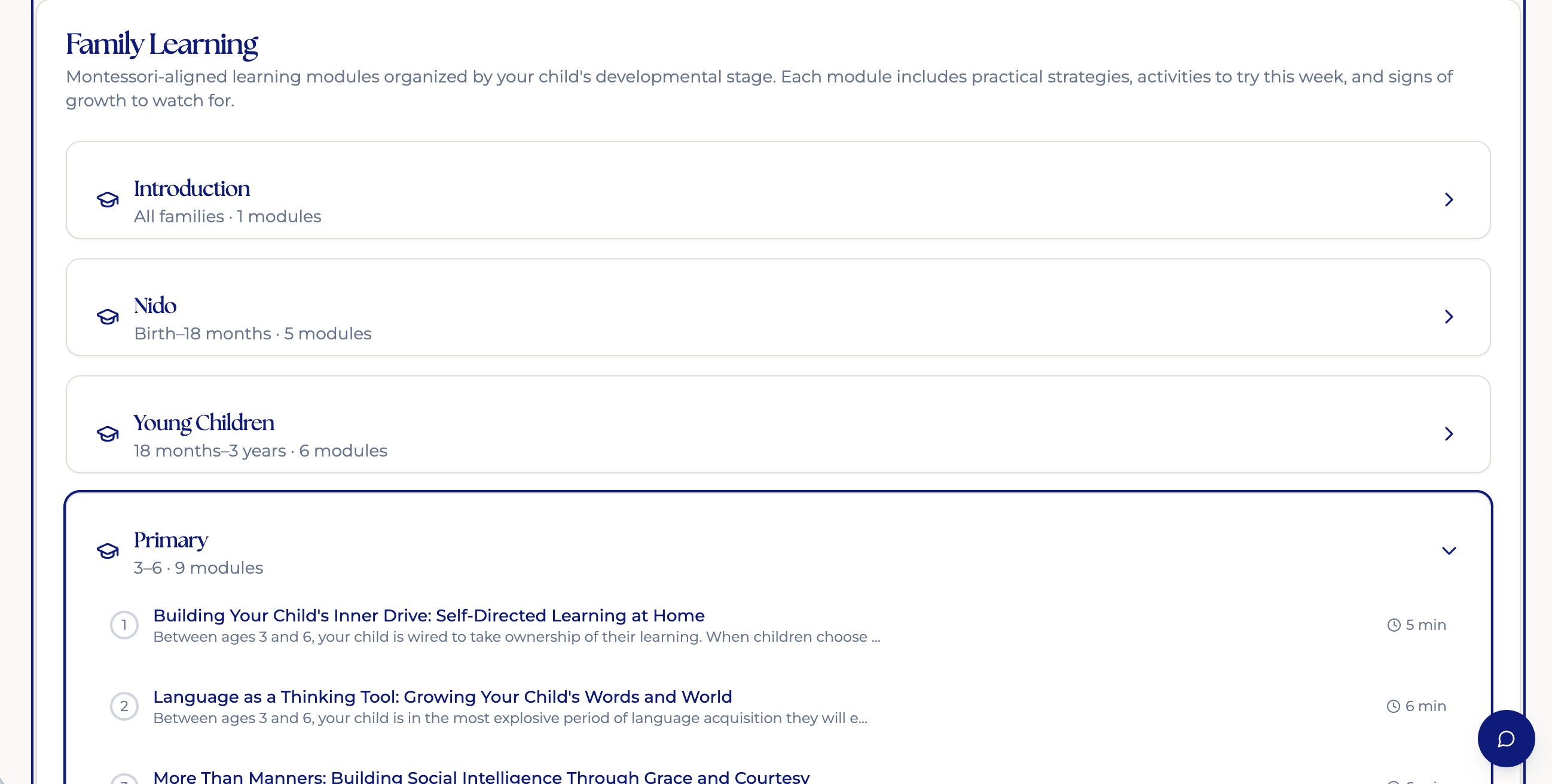
Family Learning Hub
Forty-eight Montessori education modules organized by developmental level — from Nido through high school — drip-released as children progress.
Embedded Email Drafting
Drafts for the hard messages — staff departures, parent escalations, termination letters, board updates. Four tones. Ready to copy and send.
How Data Moves
Observation becomes insight.
A guide records an observation in the classroom. That data doesn't disappear into a notebook — it flows upward, informing the school director, the organizational team, and ultimately the board.
The Alignment Platform is built on the same principle Montessori education is: concrete experience at the bottom, abstract understanding at the top. Each layer sees exactly what it needs — nothing more, nothing less.
Pilot Cohort
Currently accepting pilot schools.
The Alignment Platform is in active pilot with a limited cohort of Montessori schools. Pilot participants get direct access to the product team, discounted access, and direct influence on the roadmap.
This is not a beta test—it's a founding partnership. Schools that join the pilot are shaping what the Alignment Platform becomes.
Pilot benefits include
The Difference
Montessori-native. Not Montessori-adapted.
One system, not patchwork
The Alignment Platform replaces the collection of disconnected tools most Montessori schools are held together by. One login. One data model. One system that knows what the other parts are doing.
Built for Montessori practice
Not adapted from a generic school platform. Every workflow, every data point, every report reflects how Montessori schools actually operate—from the three-hour work cycle to multi-age progression.
Equity in the architecture
Equity isn’t an add-on or a premium tier. It runs through every layer of the Alignment Platform—surfacing patterns in attendance, belonging, access, and adult culture from day one.
Clarity without corporatizing
The Alignment Platform gives schools the operational clarity and data infrastructure they need to run well—without turning a Montessori school into a managed corporate entity.
Connected to the Field Guide
The data starts in the classroom.
The Montessori Makers Field Guide is the companion app guides carry into the classroom. It connects to MMAP through the same sign-in — no pairing step, no separate credentials. If a guide is listed as faculty in MMAP, the connection activates the moment they sign in.
MMAP gives the Field Guide each guide's classroom roster, school context, and a live per-child activity summary. The Field Guide sends back four event types: lesson presentations, behavior support moments, learner observations, and reflections guides choose to share with their mentor. Everything flows through a single sync and surfaces in the school's MMAP record.
The result is lesson delivery data that comes from actual classroom practice — not retroactive entry. Leadership sees coverage in real time. Guides see their own practice reflected back. Events queue locally when a guide is offline and batch-sync when they reconnect.
MMAP → Field Guide
Guide profile
Name, role, school, and assigned mentor name
Classroom roster
First name + last initial; supports multiple classrooms
Per-child rollup
Presentations by strand, moments by situation, observations by category, last 7 days of reflections mentioning that child
Field Guide → MMAP
Lesson presentations
Strand, lesson name, child tagged, timestamp
Behavior support moments
Situation type and steps followed in the protocol
Learner observations
Category, strategy used, child name
Reflections
Private by default; guide chooses what reaches their mentor per entry
Montessori Makers Ecosystem
The Alignment Platform is where the systems live.
Montessori Makers builds aligned schools across every dimension. The Alignment Platform holds the operational systems. Leadership Meridian supports the head who runs them. Advisory helps design them. Institute develops leadership capacity. MatchHub finds aligned staff when growth requires it.
Field Guide
In-classroom app for guides — syncs directly with MMAP
Leadership Meridian
The companion app for heads of school — reflection, coaching, and decision support
Advisory
System design & leadership support
Institute
Leadership development
MatchHub
Philosophy-aligned hiring
MMAS
Montessori-native assessment
See It in Action
Watch how the Alignment Platform works.
Short videos grouped by function. See exactly how each part of the platform works before you ever talk to anyone.
The Makers Network
A weekly email for Montessori leaders and practitioners.
Free. No noise. Just what matters to people doing this work.
MMAP · Built for schools